Buy anything from 5,000+ international stores. One checkout price. No surprise fees. Join 2M+ shoppers on Desertcart.
Desertcart purchases this item on your behalf and handles shipping, customs, and support to Mongolia.
🚀 Power your productivity with the ultimate ThinkPad docking station!
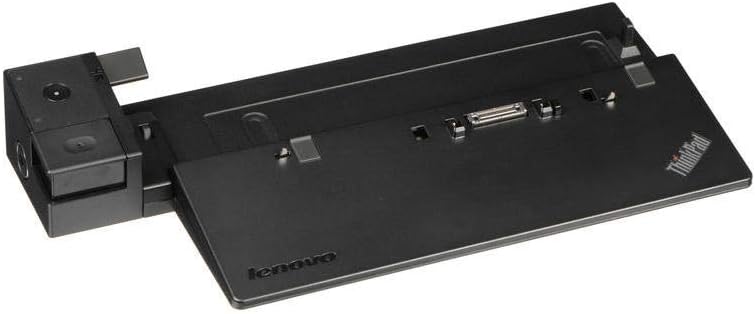
The Lenovo ThinkPad USA Ultra Dock with 90W AC adapter is a robust docking station designed for select 65W and 90W ThinkPad laptops. It supports dual external displays via DisplayPort 1.2 and HDMI, offers 6 USB ports for extensive peripheral connectivity, and includes an Ethernet port for reliable wired networking. With secure locking keys and seamless laptop docking, it enhances workspace efficiency while delivering consistent power and charging.


| ASIN | B00E0E2DIE |
| Best Sellers Rank | #8,374 in Computers & Accessories ( See Top 100 in Computers & Accessories ) #530 in Laptop Docking Stations |
| Brand | Lenovo |
| Built-In Media | 2 x security keys |
| Color | Black |
| Compatible Devices | COMPATIBLE with the following 65 and 90 wattage laptops: ThinkPad L540, ThinkPad X250, X260, and ThinkPad W550s, ThinkPad T550, T540p (dual core models), T460p, T440p (dual core models), as well as the Integrated graphics (not discrete graphics) models: T440, T440s, T450, T450s, L440 and L450 Compatible Devices COMPATIBLE with the following 65 and 90 wattage laptops: ThinkPad L540, ThinkPad X250, X260, and ThinkPad W550s, ThinkPad T550, T540p (dual core models), T460p, T440p (dual core models), as well as the Integrated graphics (not discrete graphics) models: T440, T440s, T450, T450s, L440 and L450 See more |
| Customer Reviews | 4.6 out of 5 stars 2,074 Reviews |
| Global Trade Identification Number | 00887770918281 |
| Hardware Interface | USB 2.0 |
| Input Voltage | 120 Volts (AC) |
| Item Dimensions L x W x H | 13.6"L x 6.4"W x 2.2"H |
| Item Type Name | Lenovo ThinkPad Ultra Dock - 90W US |
| Item Weight | 1 Pounds |
| Manufacturer | Arbitech Distribution |
| Mfr Part Number | 40A20090US |
| Model Number | 40A20090US |
| Number of Ports | 3 |
| Product Dimensions | 13.6"L x 6.4"W x 2.2"H |
| Smart Home Compatibility | Not Smart Home Compatible |
| Total Number of HDMI Ports | 1 |
| Total USB Ports | 3 |
| Total Usb Ports | 3 |
| UPC | 771591534617 779184037712 887770918281 887770918359 888772606619 779184521358 771591554226 803982754295 065096174905 888228988801 |
| Unit Count | 1.0 Count |
| Warranty Description | 1-year warranty |
| Wattage | 90 watts |
C**B
Great Used Product! Used with T460
I purchased a used-like new option from the seller Abe’s Electronics Center. I was a bit nervous that the product might not be in great shape with being used but wanted to save some money. This option was about half the price of a new one. Well, it paid off! The one I received was packaged like a brand new one. It included the key for locking the dock and a power cable. Everything was brand new. Based on what I can tell, the only reason that it was marked as used was due to a few scratches that are barely visible which probably occurred during manufacturing. Everything else indicates that this was probably never used. I just wanted to put that out there in case anyone else is considering a used option to save some money. It was worth it! In regards to the dock itself. The dock works great! I wanted to use two monitors in addition to my Thinkpad T460 but the laptop only has one HDMI outlet. The doc has one HDMI and two Display Port outlets. I didn’t have any Display Port cables but ordered some that came quick. They are a great option and provide amazing resolution to my two 27 inch monitors. It also has an option for an Ethernet cable which is really nice if you want to get better speed while docked. I use this computer for work and the dock has not affected the speed or functionality of my computer. My laptop clicks right into place seamlessly making it really easy to use. It also comes with a key to lock the dock so that you don’t accidentally undock it. I don’t think that you would be likely to undock it accidentally since the release button is out of the way but it’s nice to have the added security/peace of mind. Another added bonus is that it keeps constant power to the laptop and my laptop stays charging. So when I need to move somewhere else, it is fully charged up. Unfortunately, I was only able to use this for about three weeks before my work decided to upgrade my laptop to an HP. Even though it was only three weeks that I got to use it, I would recommend this to anyone that has a Thinkpad. It’s really a game changer in my opinion! If you are looking to add a few monitors, simplify your setup, or minimize the amount of cables you have to unplug when moving your laptop, I highly recommend this!
C**N
An astonishing value
I've been a Thinkpad user for decades. There are certain aspects of the brand that just work for me. The dull black plastic looks good after years, the clunky look is durable and timeless, the keyboards are almost always very pleasant and easy to type on, even on an airplane, and these docks. This dock looks very similar to the one I had 15 years ago for my IBM built thinkpad. I'm using this with my pair of T440 laptops, cheap old laptops that have excellent keyboards and are a steal to buy refurbished. though it's not listed in the compatibility list, it works flawlessly. The laptop slides very easily onto the dock, even with the extended life battery, and pops off very smoothly, without a click or any real mechanical noise. It's a nice improvement over the older docks. You get tons of USB ports, an HDMI port, a few other video ports. Truthfully the T440 isn't powerful enough to support a bunch of screens anyway, but you could run a pair if you wanted, and there are much more powerful laptops compatible with the dock. For the low price of this product, you get a really convenient way to connect a desk of accessories, and the T440 didn't have a normal HDMI port anyway. If this is compatible with your Thinkpad, it's a really good bargain and I found no defect with the way the laptop docks (some reviews for some docks complain about design flaws, but this model doesn't seem to have them.
P**K
Killer deal, all features work on Linux
tl;dr: • multimonitor works on Linux • 75-85% off makes it a hell of a deal • Lenovo cheaped out on the AC adapter, but it's fine I picked this thing up because it's compatible with my personal laptop, which despite having a Thunderbolt port, doesn't support my existing TB3 docks. (I think this is for want of PCI-E bandwidth; my TB docks are dual 4k but the laptop's TB3 lane is only 2x.) My first complaint about this thing is that it didn't actually come with a slim-tip AC adapter. Instead, it came with the old barrel-type and a very short adapter cable. That adapter cable caused problems for me, but I only noticed the problem after I had dropped and stepped on it, so that may not be Lenovo's fault at all. The problem is that due to slight tweaks or a will o' the wisp, the power would get cut to the device, and when it powercycled, my monitors didn't come back. I picked up a very cheap, third-party, aftermarket slim tip adapter with decent reviews, and I've had no problems of that kind since. LIMITATIONS: For multi-monitor use, the bandwidth limitations on the two DisplayPort ports on the dock allow only 3840x2160@30Hz each. This can be troublesome if your monitors use more bandwidth than that. Both monitors I have hooked up are that way: one is 3840x2160@60Hz and the other is 2560x1440p@165Hz. This means that with both plugged into the dock, sometimes only one will show up or give any output, but this can be worked around. Additionally, each DisplayPort port is paired with another video port of a different type, and only one of each pair can be used together. So it supports only two monitors. I have had no success daisy-chaining standalone MST hubs to try to add a third monitor, but I have only tried with one so far. LINUX QUIRKS You will need a recent Linux kernel for this to work. I'm running Linux 5.3 on NixOS. Additionally, sometimes a monitor will not show up in the KDE graphical display management tools, even though it is visible in the output of `xrandr -q`. Even when the graphical display is broken, however, VTs pretty much always work. So I have gotten my monitors to behave by instructing xrandr to set the resolutions and refresh rates from the virtual terminal, then quickly switching back. My shell is Fish, so the command in my specific case is this: sleep 10s; xrandr --output DP2-1 --mode 2560x1440 -r 60; xrandr --output DP2-2 -m 2560x1440 -r 60 and then switching back to the VT of the display server. OTHER NOTES: The laptop runs really hot most of the time when it's closed and pushing as many pixels as it can on the two external monitors.
D**5
A must have for home office lenovo laptops
Pro: 1. Extra ports 2. Easy docking 3. No issues with dual monitor (2 Display port). Can extend desktop 1 & 2 just fine. Laptop can be a 3rd screen, but i usually just go with the two monitors. 4. USB ports work fine. Even multiple usb keyboard/mouse dongles, recognizes more than one keyboard & mouse if you have them. 5. Mic port works fine also for head set. (trrs) Neutral: 6. Had some compatibility issue with a KVM switch, it may be the kvm / driver. It didn't recognize the keyboard and mouse from KVM. con: 1. none for now. Had it for a few months, so far so good, no issues.
C**N
Works pretty well
I bought a new Thinkpad T440p laptop a few months ago, and right after that my desktop computer croaked. After thinking about buying a new desktop it occurred to me that the T440p had enough processing power and memory to be my desktop, but what it didn't have was sufficient ports as I had multiple monitor and quite a few USB 3 hard drives connected to the old desktop. So rather than buy a new desktop, I bought this docking station. I had my old desktop sitting in the basement in the server room (I'm an I/T consultant and have my own server room :) ), and the monitors, speakers, mouse and keyboard are upstairs in my office, connected via optical cables, so that I don't have to hear the fan noise. I setup the dock in the same place and everything works. The USB hard drives are downstairs with the dock and I'm able to use the same monitors, speakers, keyboard and mouse upstairs as with the old desktop. The only downside to the whole setup, and the reason I didn't give the dock 5 stars, is that the monitors are slow to react when the resolution changes, and they weren't slow to do so when the old desktop was connected to them. It takes 3-5 seconds longer than normal for that to occur, during which time you miss whatever should have been on the screen. It's not usually a problem, but if you want to see something like the bios messages on a boot-up, where the resolution is switching several times, it can be a problem if you want to hit F2 at the right moment to enter the bios setup screen, or F12 to go to the boot menu. This is probably only an issue for someone like me who is a computer geek and messes with things like the bios often enough to be a little annoyed by that behavior.
D**M
Awesome docking station! Genuine product!
I bought this docking station to pair with my recently purchased ThinkPad T460. This docking station makes it so easy for me to just set my computer on it at night and have it automatically back up to my hard drive. Plenty of ports available on the back, all of which work properly. This docking station includes a 90 watt power adapter, which is much faster than the standard one included with the ThinkPad. The dock also has a lock on it, which is a useful feature to stop the most basic of thieves, seeing as they could just simply unplug the station and walk away with it, but i'm pretty sure it's intended for if the station were screwed down to the desk. It is super easy to dock and un-dock, and this feels like a very solid product, definitely an OEM product as well. If you have a ThinkPad of similar model and need a docking station, you can never go wrong with a Lenovo OEM product.
S**Z
Pleasantly Surprised
These used to go for absurd amounts of money and plenty of vendors are still selling them for unreasonable amounts of money. I half expected this to be some sort of refurbished/used unit or an off brand product. It came in generic brown cardboard, sealed with lenovo branded tape, packaged very robustly. It was indeed the official lenovo dock with power supply and keys to lock. Its a very nice product that adds alot of convenience and functionality. Great bang for you buck.
C**R
ThinkPad Must Have Tool
Two years ago I bought a used Pro dock for twice the price of this one. It serves me well and will continue to be used to give me docking capability in another location. This item is a steal of a price. If you have a compatible ThinkPad, this is a must have tool. Edit Update: After updating system device drivers via "lenovo vantage" I had both USB2 and 2USBv3 ports die. One USBv3 port still worked. Fix is: Device Manager > Universal Serial Bus Controllers > USB Root Hub (USB 3.0) right click Disable and then Enable returns USB port ops. Doesn't take much time but a definite gut punch from lenovo.
J**L
Best accessory I never knew I needed
I never realized how much I would love having a docking station for my laptop. When I get home, the laptop comes out of the backpack and onto the dock. It's immediately connected to a second monitor, bigger keyboard, and all the usual array of USB accessories one typically finds on a student's desk. When I want to take the laptop to the living room, nothing needs to be unplugged, just a quick tap on the eject button and it's ready to go.
L**A
¡EXCELENTE!
El Dock resultó ser mejor de lo que esperaba, tiene varias funcionalidades que hacen que el precio que pagué por el ($600) sea el dinero mejor gastado. - Para empezar, incluye un cargador de 90w, es decir, el doble de potencia que el cargador que incluye la laptop y permitió que el cargador que tenía fijo en casa lo pueda tomar como cargador extra en el trabajo. Al tener el doble de potencia, el dock carga más rápidamente tu laptop. - Puedes conectar hasta 3 pantallas simultáneamente ya que cuenta con varias salidas de video: 1 HDMI, 1 DVI, 1 VGA y 2 Display Port. - En el caso de mi laptop T450, no cuenta con salida HDMI, tenía que usar un cable de mini DP a HDMI, pero la ventaja del dock es que ahora tengo salida de video 4K. - Tiene 6 puertos USB, de los cuales 3 son USB 3, contiene un puerto "USB always on" es decir, podrás cargar cualquier cosa con esos puertos aunque tu laptop esté apagada o no esté en el dock. - Mejora la ergonomía del teclado, al levantar la laptop unos 20°. - Contiene un par de llaves para evitar que el dock de desprenda de la laptop y por otra parte, el dock tiene entrada de candado de seguridad. cuando activas seguro del dock, se ilumina una luz led indicadora. - Incluye también un botón extra para prender y apagar tu laptop, aunque no le encuentro mucha utilidad, y por último, incluye un puerto Gbit Ethernet, aunque no he probado si puedas usar los dos ethernets simultaneamente, aunque no debería tener problemas. En conclusión: Si tienes una laptop compatible, no lo pienses, es mayor la utilidad que el precio.
G**K
Arrived quickly and works perfect.
As expected. Arrived quickly and works perfect.
J**Y
Useful
Works great. Came with all accessories. Very happy with purchase
L**Z
Compra estupenda
Una de las mejoras compras que he hecho. La estación de trabajo viene con seis puertos USB, salidas HDMI, VGA y Display port. Uno de los puertos USB está siempre alimentado, lo que permite cargar un dispositivo, celular, tablet, cámara fotográfica, etc, aunque la laptop no esté siquiera en la base. El adaptador de corriente es de 90 watts, que permite alimentar la estación de trabajo y la laptop simultáneamente. Tiene un candado que evita se pueda extraer la laptop sin autorización. Y enciende un LED que avisa en estado de este seguro. La base eleva la laptop, para una mejor ergonomía al escribir y permite la ventilación del equipo para un uso más fresco.
Trustpilot
1 week ago
1 day ago