Buy anything from 5,000+ international stores. One checkout price. No surprise fees. Join 2M+ shoppers on Desertcart.
Desertcart purchases this item on your behalf and handles shipping, customs, and support to Mongolia.
🔑 Unlock convenience and control with zero hassle!
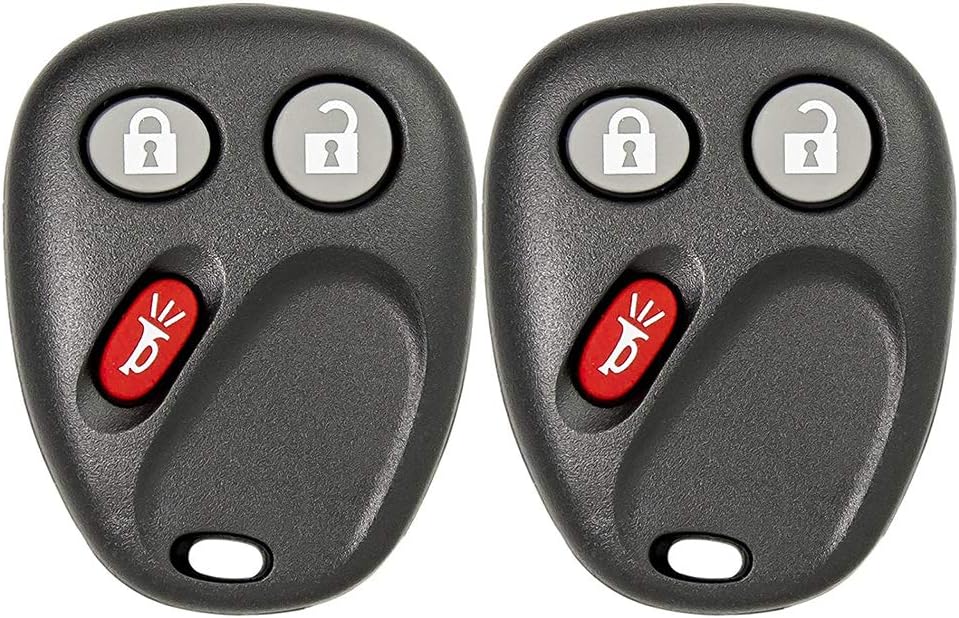
The Keyless2Go Replacement Key Fob offers a quick, affordable solution for lost or broken remote car keys. Compatible with multiple GM brands, it features easy DIY programming with included batteries and pre-testing to ensure reliable performance. Perfect for professionals seeking seamless vehicle access without dealership delays.

| ASIN | B00Y1HRMFO |
| Automotive Fit Type | Vehicle Specific Fit |
| Best Sellers Rank | #846,898 in Automotive ( See Top 100 in Automotive ) #3,956 in Keyless Entry Systems #451,360 in Automotive Replacement Parts |
| Brand | Keyless2Go |
| Brand Name | Keyless2Go |
| Button Quantity | 3 |
| Compatible with Vehicle Type | Car |
| Customer Reviews | 4.6 out of 5 stars 5,096 Reviews |
| Item Dimensions L x W | 3"L x 1"W |
| Manufacturer | Keyless2Go |
| Manufacturer Part Number | R-GM-LHJ011.go--X2 |
| Model Name | 2AOKM-GV2 |
| Model Number | R-GM-LHJ011.go--X2 |
| Number of Buttons | 3 |
| Product Dimensions | 3"L x 1"W |
| Vehicle Service Type | Car |
A**N
Great Replacement keyfob
Well worth the money. When I bought my 2003 Tahoe a few years ago it only came with one. It recently stopped working even after replacing the battery. For my car, I didn't need any extra programmer or anything. Just searched YouTube for a video and its super easy, just a few turns of the ignition and pressing the door lock button a few times. It took less than 5 min to program both. So far they seem to work great. Highly recommend.
S**.
Excellent,Excelent,Excellent AWESOME!
Just recieved the 2 remotes in the mail this morning. It only took 2 days and thats only becuause i had ordered it on a saturday. so basically it took one buisness day. Love that 1 day amazon shipping! Anyway, the remotes arrived in a padded shipping envelope (wich was more than sufficient) it came with a small piece of paper that had a website on it to go to in order to program the remotes. again (more than sufficient). I Found my vehicle imediatley (2003 Hummer H2) and proceeded to program them along with my half broken original remote (programing the new remotes wipes the memory so you have to reprogram all remotes together). It was 6 easy steps...that of course, me being too excited to get them working....messed up a couple times. But, by following the 6 step intructions, it was easy.It only took about 10 min. from the time i opened the package. Now, I have 3 remotes for my Hummer. The new ones work better than my original. The only suggestion i can offer when programing the remotes is...If your vehicle is like mine, I have 2 driver settings for seat adjustments, Mirror postions and other programable functions within my vehicle so, depending on what remote i unlock the truck with, those positions are recalled. So when following the last step for programing the remotes, do them in the order that you want to use them. Such as, my "Driver #1" is my regular key fob and my "Driver #2" is for my spare set of keys and (i had no idea that i could program a "Driver #3) now i have a 3rd spare remote for the truck. so, I highly recommend these remotes. the local retailers around here wanted 50 to $60 for 1 of them. you cant beat this price and i didnt need to take it to a shop and pay to have them programed. As i always do before making any purchase ... i read the reviews and most are very positive and the state to make sure that your vehicle is compatible with these remotes by checking the number on my remote. That was easy to do for me becuase the number is on the back of my original remote. so make sure you check. Again.... Great Remotes... High praises from me for sure! ive been struggling with my broken original remote for yrs. so i was looking very silly jumping up and down in my driveway to the neighbors.... thanks "Amazon and special thanks to "Keyless2Go
C**L
The best replacement for the best price.
Great product and really easy to install. Definitely worth the price.
A**R
They Work
Easy programming, and they work!
K**E
2006 Silverado Truck (instructions need some work)
Good deal on cost and both mine work after programing. Their instructions needs some help though. Especially the part of pushing each of the 3 buttons 26x to deprogram. My fob barely works, no way is it going to do anything over 75 times. I ignored that completely. Skipped right to door shut, key in. hold unlock door button down, while holding unlock button cycle ignition on then off, then on then off. No matter what my doors cycled DURNING this operation. Which instructions said was an error, too slow too fast or vehicle issue. WRONG! I tried a few times it always cycled locks during the key operations. So third time I let go of door lock button after cycling (and once again it did not cycle as the instructions wanted) I did the next step anyway. Hold down both buttons on remote til the doors cycled up to 30 seconds. The lock and unlock button. It worked fine, the locked cycled, I then did second remote. I didn't bother programing factory remote or any of that nonsense its going in the trash. So you may have to ignore some of the instructions and proceed to further steps anyway. It worked for me. My truck was in program mode even when instructions said it would not be. I bought truck used with only one remote. Happy to have Two new remotes for it, 16 years later.
W**4
Wish I would've found this sooner! Works great on 2006 2500HD!
I purchased my truck used, (2006 Silverado 2500HD) and it had an aftermarket remote start/alarm system on it, and no OEM key fobs. Ran for years, but recently stopped working leaving me having to use the ignition key to unlock the truck, which is kinda a pain. Stereo shop wanted $1100 for a replacement remote start / alarm system, which was more than I wanted to spend. Called dealership to try and find an OEM fob for key-less entry and was told they discontinued making those. Found these as an option and for about $20 to my door figured I'd give it a try. Very easy to set up and get synced with the truck and I'm happy to have key-less entry again.
D**L
Great product.
Works great.
J**F
got 2 pack
I got the 2 pack of the FOB's. I had no problem programming the first the one. however, the second one would not program and the factory set ones that came with vehicle erased and stopped working. I emailed the company and they replied asap with step by step instructions. I now have the 2 new FOB's working plus the original factory set remote FOB's ...here is the step by step instructions. Follow instructions exactly and you will have no problem. What you need to do to get the remotes working for the vehicle is to program them both while the vehicle is in programming mode (program mode is steps 1-5). Once the vehicle is in programming mode, 1) press the buttons (according to step 5 & 6) on the first remote. ( This is where I went wrong so make sure you hit the driver's side door panel first before you do the FOB) , Once the vehicle responds confirming successful programming of the first remote, press the buttons on the second remote right away. Do not hit any buttons in the vehicle or do anything else with the key before you proceed to the second remote. Once the vehicle responds to the second remote, repeat for any additional remotes. Once the vehicle has responded indicating all remotes are programmed, proceed with the procedure and exit programming mode. Once this is done all of the remotes should work. Please make sure you have all the remotes including the old ones with you. \ Take note of Step 7 on the procedure below. 1. Close all doors on the vehicle. 2. Then insert key into the ignition. 3. Press and hold the power UNLOCK button on driver’s side door panel. Do not release until instructed to do so in step 5. 4. Quickly turn the ignition ON, OFF, ON, OFF. (ON is the position just before of starting your vehicle, OFF is the position where you can pull your key out of the ignition) 5. on the driver’s side door panel, Release the power "UNLOCK" button on the driver's side door panel. The vehicle should respond by locking and unlocking automatically. 6. Hold the LOCK and UNLOCK buttons on the remote at the same time until door locks cycle again. This could take up to 30 seconds. 7. NOW repeat step 6. for all additional remotes including working ones. 8. TURN ignition to ON to exit programming mode. 9. Turn ignition OFF, remove key and test all remotes to make sure that they are all properly programmed.
M**7
Precio- calidad, excelente
Súper fácil de programar, simplemente con leer los pasos en la descripción.
E**A
Muy util
Un poco complicado la programación pero sirvio muy bien
Trustpilot
2 weeks ago
2 weeks ago