
CLEAR miniDSP 2x4 Digital Signal Processor
Product ID: 22163890
Details
- BrandminiDSP
- Mounting TypeStandalone/No
- Number of Pins16
- Interface TypeUSB
- Number of Channels2
⚡USB powered convenience
🔊24bit/48k audio quality
🔌6 channels of flexibility
🎶 Elevate Your Audio Game!
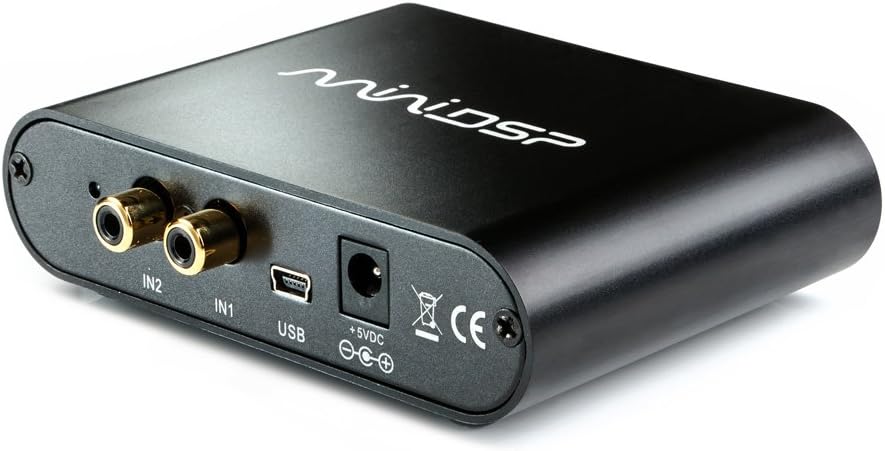
The 2x4 USB Digital Signal Processor (Part Number 700-124B) is a standalone, high-performance audio solution featuring 24-bit/48k resolution and 6 channels. It includes a miniDSP 2x4 software license for easy setup and customization, and can be powered via USB or DC supply, making it a versatile choice for audio professionals.
| Customer Reviews | 4.4 out of 5 stars 153 Reviews |
S**D
Reliable, easy to use, versatile
I bought 2 of these to run a pair of 4-way speakers I built. They are reliable, easy to use and extremely versatile. I will be buying more in the future for other projects. Fantastic product at a low cost, even if you want to just use it for EQ. Update: I bought another one to run by bookshelf speaker and subwoofer for my computer. Remains amazing.
T**S
THIS IS THE BEST SOUND CORRECTION DEVICE EVER
This is def the best. I bought this product to fix my monitors in my studio and do a sound repair. To use it in that manner you do have to purchase a Dirac license, but I would def recommend you do that if sound correction is what you need. This saved my life! Now I mix and master at home.
X**M
Excellent Performance
First, there seems to be some confusion regarding Rev A (0.9vrms in/0.9vrms out) vs. Rev B (2vrms in/0.9vrms out). This is understandable as revisions generally mean design changes. In the case of the miniDSP it would have been better to refer to them as Mode A and Mode B, for they can be easily changed via internal jumper. Our application is intended for an in-house design of a high-end 3-way speaker system. We started with a profession two channel 3-way crossover, adjusting the crossover to obtain an initial optimum performance limited by the capabilities of the crossover. We then carefully measured the parameters of the crossover to transfer to the miniDSP; this would provide a starting point, and an immediate performance comparison between the crossover and the miniDSP. While we have not yet performed a formal A/B comparison; the initial reaction was the minDSP duplicated the performance of the crossover to an amazingly high degree. This now gives us a starting point from which we can refine the speaker-system to include component time-alignment, which the crossover was not able to accomplish. The accompanying support/programming software is relatively straight forward, although we did note one occasion where a parameter was set only to find it had reverted back to its default value. The issue may be do to the fact that there are two ways to navigate through the sub-blocks of the miniDSP; direct selection of a block and a sequencing arrow-icon that serially steps through each block. We are still investigating this issue. Also, there may be a slight insertion loss even if both the input and output of a given channel are set to 0dB. We are very pleased with the performance of the miniDSP 2x4 and would not hesitate to recommend it. UPDATE: We discovered a minor issue with the miniDSP 2x4 Output-Delay [version 1.06 (1.6 as displayed within plugin)]. The initial delay increment 0.02083 ms (1/48 Sec), is not sent to the DSP, even though it displays in the plugin. This was detected in two ways; comparing the input to the output; and routing the input to two outputs, delaying only one output and then comparing the delay between the two outputs. There is a simple work around simply increment the delay one more than required will provide the correct delay (as mentioned only the initial delay increment is not sent to the DSP, all subsequent increments are sent. Actual Delay = Displayed Delay - 0.02083 ms). The company has a pre-release update that corrects the problem. We still highly recommend this product.
R**E
miniDSP 2x4
Let me say this first, I have read reviews that say that you can daisy chain active sub-woofers and it will work. I can attest that daisy chaining active sub-woofers does not work. After having multiple issue with daisy chaining 4 sub-woofers ( Acoustic, Pioneer, KLH ), I decided to look for a solution. 1. You can daisy chain if they are the same manufacturer 2. They have a separate output or a line-out or pass-thru You cannot if the above is not met. A simple solution is the miniDSP 2x4. It will allow you to setup up to 4 separate sub-woofer from different MFG. This is very simple. First you need to get the 2x4 Advanced plug-in and then email support to have them unlock the Matrix-mixer, after that you need to setup each sub-woofer separately first. First thing is to set the internal volt to 0.9 V RMS, that is a jumper next to the 2 input terminals inside the miniDSP. For me I choose input 1 > crossover 200 Hz LR 12 DB / Octave > no eq > routing all 4 set to input 1 > no output eq > no gain and all high pass and input 2 set to bypass. Connect a usb microphone to your computer, make sure the microphone has a 20 Hz to 15 Khz response and is certified for testing. Place the microphone at least 1 meter away pointed directly at the sub-woofer, run the spl level test. Try and set the SPL to at least 89 DB / 1 meter, if the sub is not capable then find its highest SPL / 1 Meter, repeat this test for each sub woofer. Once you have all say 3 sub's tested and you have 87, 89. 91, add the 3 and then divide by 3 or 267 /3 = 89, this is you mean SPL. Now we know that sub 1 can only hit 87 DB SPL so we will set are over all output to 87 DB SPL for all three sub woofers, that should give us a mean output of 89 DB SPL overall ( know it sounds crazy but trust me the math works) since i have a Yamaha RX661 receiver that has auto room acoustic built in all you need to do now is run the auto room acoustic, and you are done. Lastly make sure you buy the AC Adapter as you will need to apply power to the miniDSP 2x4. Over of Product Documentation The documentation is confusing, you actually cannot figure out which is the correct plug-in to purchase, you need to send an email to support to figure this out, and there response time is rather slow 2 to 3 day wait. The plug-ins do not come unlocked, so feature even after purchasing are still lock and the only way to unlock is to send an email to support to get them to unlock it another 2 to 3 day wait. The software The software is really straight forward (once you get the correct plug-in), you can do the advance features, if you want to run all the test tones, and graphs to complete it, but for simple crossover you can use the basic and dial-in the frequencies you need and the work up from there, trust me start with the basic and work up from there. Each plug-in cost about $10 which is nice price. Hardware The miniDSP 2x4 Box is solid, it has internal jumpers, so read the manual before you use it to make sure the jumpers are in the correct setting for your application. It does not come with a AC Adapter but you can get one easily and very inexpensive. the case is metal, the connectors are gold plated, has one power in and a USB-A connector. Performance Now as I stated above this will allow you to run up to 4 sub woofers from different MFG easily. And the sound is AWESOME!!!, if you follow how to set it up correctly. I got the info from the MinidDSP website, it will balance the sub-woofers to the same SPL and the same voltage that daisy chaining does not do or allow. Each sub-woofer has it own 0.9 V RMS input and it own 0.9 V RMS output ( it is not shared as in daisy chaining ) , you can fine tune each sub-woofer independently or as a group or as sub-pair ( IN-1 > 1 and 3 with front EQ setting , IN-2 > 2 and 4 with REAR EQ Settings ). It is not only for sub-woofers, it can be a 2-way or 3-way and even 4-way crossover, just depends on the software you use. Overall a good product, documentation needs to be improved, support needs to response a little faster. That is why i am giving it only 4 stars as I had to wait 6 additional days to get my purchase ( after waiting 3 days on shipping) working, and that was only after I figured out that the instruction did not match the software, even after downloading purchasing all version of the 2x4 plug-ins, to only find after contacting support that these features needed to be unlocked. ( the unlock part is NOT in any of the documentation )
C**J
powerfull
It’s ideal for tasks like crossover tuning, subwoofer integration, room equalization, and custom audio processing in home audio, car systems, or studio setups. The DSP engine and 24-bit ADC/DAC provide good sound processing accuracy, and the real-time software control makes adjustments easy for enthusiasts and DIY builders.
J**9
No documentation makes this a tough recommendation
The miniDSP is a programmable device which can be used in room correction for subwoofers or designing crossovers and other audio applications. Anything that can be adapted into multiple uses means complex implementation. Unfortunately, the device comes with absolutely no documentation. It supposed to come with a redemption code (mine didn't) which allows you to download whatever app that fits your needs. The code can only be used for one app so if you download the wrong app, you have to buy any other apps that you need. The device points you to DIY user guides made by other users. The problem is that the user guides and YouTube videos are quite old and many directions are no longer valid as the software has changed. The guides also fails to inform you that there are several things that must be configured in Windows 10 before the app will even work. The guides also fail to inform you that certain criteria must be met before the app functions properly. An example is that the miniDSP needs your laptop or PC to connect to your amplifier through a HDMI port to generate the test sweep for measurements. The guide fails to mention that a lot of laptops and PCs are not able to generate the test tones as they only support 2.0 audio which does not support LFE signals. There is no mention that you need to use the audio out from your laptop directly to the miniDSP as an alternative (I got this from their tech support who mentioned that they do not recommend the HDMI port method). Also, the guide does not mention that you must reconfigure your laptop every time you launch the app. After three long days of fruitlessly trying to get the miniDSP working, I decided to return it. Something like this should not be bought unless you are willing to put in the effort required to get it working through trial and error. If your laptop meets its requirements, I am sure it would be a lot easier, but if it does not you are in for a real painful experience.
G**N
Hard to believe a little box could be so powerful
Obviously this is not a beginner toy, and if you don't understand system tuning or have a step-by-step guide, the product is not for you. I also have the 2x4 balanced for my mixing setup and as they have the same set of features, my opinion is the same for both. Yes, this unit can be USB powered. So I didn't bother buying the extra DC adapter, I just use a USB wall plug and the provided mini-USB cable. The only downside is that when I need to look at the settings or re-tune, I unplug the USB from the wall and put it in my computer, so the unit is powered off and back on. Luckily, losing power does not cause the unit to output any voltage spike that could damage equipment! So three cheers for that. It's hard to believe that this can do so much low latency processing, and just WORK. I'm using the 2x4 Advanced plugin. The EQ sounds good, even the output compressor sounds good though I am not using it. Long story short, what this unit does, it does well. Compared to other solutions, this is pennies on the dollar.
B**G
difficult
Worked for me. Though fairly difficult to work with. The have several different versions of the software that programs the device and they don't do a very good job at explaining the difference. Normally that would not be a big deal. It costs $10 per program though the first is free. You could end up spending an extra $30 if you choose incorrectly 3 times. They don't explain why one would choose revision A or B. after trial and error I found out I needed revision A. Most companies on amazon a shipping B. The difference is if your using a device that controls volume to the subwoofer like a receiver or preamp you want revision A. If you have a device that is always sending full volume to the subwoofer you want B. The software is confusing. When they says Synchronize they really mean Connect. I kept wanting to click synchronize to send changes to the device. The device interactively sends changes so you just need to click synchronize once a a tuning session. There's just a long list of things like this. Plan on spending several evenings working through the confusion.
M**R
Ich bin BEGEISTERT! Aber Achtung: nichts für Plug-and-Play-Menschen
Vorweg für alle aus der "ich finde an allem was zu nörgeln"-Fraktion und Technik-Dummies: das miniDSP ist kein Plug-and-Play Gerät, welches man eben mal kurz anschließt und sofort Ergebnisse liefert. Es bedarf schon etwas Hintergrundwissen zum Thema Akustik und Raummoden, sowie entsprechendes Messequipment und natürlich Zeit um das Potential des miniDSP auszuschöpfen. Selbsredend, dass das miniDSP die Gesetze der Physik (schlechte LS-Aufstellung, Raumakkustik wie Nachhall, etc.) nicht umgehen kann. Aber all dies vorausgesetzt, ist das Gerät in der Lage, die Basswiedergabe in heimischen Räumen immens zu verbessern. Das Einsatzspektrum reicht vom Single-Sub bis hin zu einem einfachen (2+2) DBA. Ein weiterer hervorzuhebender Nebeneffekt ist, dass das miniDSP die Subwoofersignale perfekt vom Stromnetz trennt. Ich war mit meinem Klipsch-SW schon am verzweifeln ob des deutlich hörbaren 50Hz-Brummen. An das miniDSP angeschlossen, und seither herrscht Ruhe im Karton (allein deswegen hat sich die Anschaffung für mich schon gelohnt). Noch etwas zu dem "fehlenden" Netzteil: Na und? In einem normalen Haushalt liegen i.d.R. eh reichlich USB-Netzteile ungenutzt rum. Ich versorge das miniDSP übrigens per USB-Kabel direkt vom Verstärker mit Saft, somit ist dies automatisch Strom-los, wenn ich den Verstärker ausschalte.
I**.
splendido oggetto
facile da usare (ricordarsi di scaricare il software subito, se no poi costa 10 dollari). Molto utile anche sul piano didattico, per imparare a programmare un DSP audio.
A**S
Bra service
Bra service
L**O
quello che volevo
DSP spettacolare e facile da configurare. Peccato che non abbia gli ingressi bilanciati
G**R
Das miniDSP 2x4 ist im Bereich Soundanpassung sehr gut
Ich benutze es für die Anpassung des Subwoofer. Zu dem Preis und natürlich mit einer Raumeinmesssoftware ist es absolut top. Es braucht sicherlich einige Zeit um damit gute Ergebnisse zu erzielen, aber dann hat man eine tollen Sound.
Trustpilot
2 days ago
1 month ago