Desertcart purchases this item on your behalf and handles shipping, customs, and support to Mongolia.
🖱️ Elevate your desk game with precision, comfort, and control!
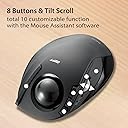
The ELECOM Deft Trackball Mouse Wireless M-DT2DRBK combines an ergonomic design with 8 programmable buttons and a high-performance gaming optics sensor for precise tracking. Its wireless 2.4GHz connection includes a battery level indicator, while the easy-to-clean trackball reduces wrist strain during extended use. Compatible with Windows and macOS, this compact, lightweight mouse is engineered for professionals seeking productivity and comfort in one sleek package.


| ASIN | B0171QQ7FM |
| Additional Features | 4 Way Scrolling, Ergonomic Design, Programmable Buttons, Wireless |
| Antenna Location | Business, Home |
| Best Sellers Rank | #36 in Computer Trackballs |
| Brand | エレコム(ELECOM) |
| Button Quantity | 8 |
| Color | Black / Black ball |
| Compatible Devices | Personal Computer |
| Connectivity Technology | 2.4GHz Wireless |
| Customer Reviews | 4.2 out of 5 stars 3,484 Reviews |
| Enclosure Material | Plastic |
| Global Trade Identification Number | 04953103473713 |
| Hand Orientation | Right |
| Hardware Platform | Laptop, PC |
| Included Components | AA battery, Japanese manual, Receiver, Trackball mouse |
| Item Dimensions L x W | 4.9"L x 3.7"W |
| Item Type Name | ELECOM 2.4GHz Wireless Finger-operated Trackball Mouse EX-G series 8-Button Function with Smooth Tracking, Precision Optical Gaming Sensor (M-DT2DRBK) |
| Item Weight | 4 ounces |
| Manufacturer | ELECOM |
| Mfr Part Number | M-DT2DRBK |
| Minimum Required Operating System Version | Windows 8 |
| Model Name | ELECOM |
| Model Number | M-DT2DRBK |
| Mouse Maximum Sensitivity | 1500 dots_per_inch |
| Movement Detection | Trackball |
| Movement Detection Technology | Trackball |
| Number of Batteries | 1 AAA batteries required. (included) |
| Number of Buttons | 8 |
| Operating System | Windows 8, Windows 8.1, Windows 10, Windows 11, macOS 10.10 |
| Power Source | Corded Electric |
| Range | 10.0 meters |
| Special Feature | 4 Way Scrolling , Ergonomic Design, Programmable Buttons, Wireless |
| Style Name | Wireless |
| Unit Count | 1 Count |
| Warranty Description | 1 year manufacturer |
S**Z
Helped a lot with my hand injuries from repetitive work!
Really nice mouse, helped a lot with my hand injuries from repetitive movements at work. I love the 8 programmable buttons, and the software allows you to program multiple simultaneous presses of the keyboard as well as gestures. It's pretty lightweight, but that doesn't matter as you don't move your mouse. I can't speak to the durability too much as I've only had it for a couple of months, but it's survived traveling in my backpack to the office totally fine - the ball never popped out of its socket. I wish it had bluetooth or was USB compatible, but it's not a big deal. Takes about a week to get used to if you've never used a trackball before. I would definitely recommend this as an option for people experiencing hand injuries due to pivoting at the wrist or doing very repetitive computer work.
A**Z
UPDATED. 2023.
All in all a great product. Size, feel, quality all on par or better when you consider price. I bought this one just to try it out and see if the company was legit. I can honestly say that i am more than sold on the company and the quality and i have no reservations about spending considerably more for one of their high end models. Im actually excited to see this company's high end features bells and whistles.. The only real issue with it is customizing the extra buttons. The software they provide is garbage. And to make matters worse, isnt even in English. You will have to find another software to customize the 6 7 8 buttons. This is the issue that keeps me from giving it 5 stars. But other than that, its terrific. Fast, accurate, comfortable. And at fair prices... i highly recommend. UPDATE: Its now 2023. Ill save u the details but I was asked to give my opinion on ergonomics as it relates to office workstations. I was given the opportunity to do some research on several companies including Logitech, Kensington, and Elecom. The funny part is no one on the team had even heard of Elecom before my recommendation. Comes to find out, they chose Elecom mice for every new workstation in the facility including the main dispatch center hub where they no doubt are going through a trial by fire. And not a single complaint has come up about the performance, and they were actually praised for their customization as dispatchers like to program their mice with their own shortcuts for maximum speed and efficiency during their shifts. So I must retract my initial review about their programming software and tell you that it's much improved. And that's not just from me. That's from a whole 911 dispatch center crew of over 30 dispatchers who have no skin in this race. I'll be honest I forgot about this initial review and never would have paid any attention to it if I had not given it a poor review initially. I stand corrected and concede that improvements are the new order of the day. So Elecom gets the 5th star. Oh, there is still 1 tiny issue... The product info is still written in Japanese so you have to go to the Elecom website to get it translated to English. Lol. Pound for pound.... And I can't believe I'm saying this... Better than Logitech and Kensington. Elecom quality and price is equal, if not better than the big guys , and they offer more innovative options to their products so u get more for your money. At the end of the day, Elecom is doing what any new guy should be doing., better product at better prices, and letting their performance do the talking. And again, Elecom doesn't even know I exist and they don't pay me a single dime to say any of this.... I just believe good quality products should get a little recognition every now and then .
K**R
This one is a keeper!
I wasn't sure if I would like this or not, but this one is a keeper! I have always hated the trackball due to it causing my thumb joint to cramp up, but figured I would give this a try. I am NOT disappointed! I don't get the cramping in my index finger, as it remains extended most of the time. Only noticed some discomfort after 3 days of 14 hour stints on the computer. I use this for design work, drafting in a 2d/3d environment, so precision and freedom of movement is what I was looking for. I love that I am not moving a mouse around, just my finger. I was concerned it would be hard to get used to left clicking with my thumb, but it comes more naturally than you would expect from a lifetime standard mouse design user. I programmed the 3 top buttons for copy, paste and undo, but old habits die hard and I forget to use them as much as I should, I manage to use my keyboard shortcuts before I remember those buttons! NEED IMPROVEMENT: Website to download the software (only if you want to program the mouse buttons- it works without this) is mostly in an Asian language, so not easy to know you are downloading the correct item. Instructions are printed in MINISCULE print- including the web address for the software. Side scroll wheel needs improvement. Hard to tell if you are selecting or tilting until it is too late. It works fine, but sometimes when pressing down and holding you go from normal scroll to tilt even though you are not trying to. Maybe if the location was further forward it would help. Left click sometimes seems a little stiff on the double click (like you can't do it fast enough) it is probably due to the fact the button relies on the forward/tip of thumb pressure versus the entire button (which does help eliminate accidental clicks due to grip). Could really use a wrist rest!!
S**S
LOVE IT, BUYING ANOTHER. Well-designed portable trackball. Awesome Mac OSX software for programming the buttons.
UPDATE - April 2017 - STILL extremely happy with this cool, tuffy trackball!! I'm still working 2 intense business jobs, one of them IT and software implementation for accounting. This mouse has held up amazingly to all the road-wear I've thrown at it with travel/working in 2 locations and switching between PC and Mac. Performs great with both cheap-o Toshiba PC laptop and newer Macbook Pro Retinas (have 2 of them). Company's software for Mac - El Capitan works great for programming buttons. NO COMPLAINTS! ------------ UPDATE - November 2016 and still very happy with unit - it's held up well. Wheel squeaks but only once in a while. Same battery that shipped with it is still in use! ------------- I'm ordering another one. This is the trackball I've been waiting for. And while it's not quite perfect, it's about 90-95% there, at least for me, and worth the $. After 20 years of trackballs and heavy computer work using an array of input devices - this is one of the best. Esp if you're mega-mobile. I work in internet research, accounting software and huge spreadsheets by day then heavy computer music composition at night. Lots of numbers, details and audio/video editing. Pop in and leave the low-profile radio receiver into a USB port and it works even before you install the software. Finger hole through bottom of mouse makes it easy to pop out the ball for roller cleaning. But Trackball STAYS securely in mouse when it's put back in. You'll need to clean the rollers once in a while week if you have greasy, sweaty paws, like I do moving around a lot. Switch on bottom of unit appears to have on, low and high resolution modes. Couldn't tell much difference between low and high but I haven't been working on hi-res imagery lately in Photoshlop. USB Radio receiver tucks elegantly inside for storage if you can't leave it in your computer port. Scroll wheel did squeak for a little while but then it went away. Might be heavy humidity here and temperature shifts. I'm not too worried. I'd rather have durability and consistent performance. I'm writing this review because other trackball afficionados who need ease-of-use and portability should consider this unit. For a newly designed device, Elecom got it most of it right. If this thing is still cranking away like my half-dozen Marble Mice have, they'll really have nailed it. Will repost as this thing gets more use.
A**C
And, one more time!!
03/05/2020 This is the best finger controlled trackball that I've found in the last 15 years or so, as far as shape, customization and compatibility, BUT the quality is inconsistent to say the least. I would lower it to 2 stars, but I keep coming back for more. On the one hand I really can't afford to keep buying these, but I'm disabled and spend most of my time reading news, playing games, or tracking down interesting/fun info. So this is my major tool each day and the size and ergonomics are great. My latest purchase was in December and has had a scrolling issue the whole time. It doesn't matter which program or site I'm sing, which DPI setting is in use, or how the scrolling is set up in the software it will somehow switch to 'super speed and go right down to the bottom' - not like a page down, just really fast scrolling. Feeling kind of silly after having Amazon keep replacing these I've been trying to live with it. I'm giving p and ordering yet another. At least I'll have backups for my backup. 12/07/2019 Okay, a little longevity problem here even without dumping liquid. The problem seems to be with the negative contact spring for the battery becoming squashed and/or loose over time. I'm no longer able to work on small objects so this was determined by originally successful jiggling (highly descriptive old tech term) the battery, later successful gently re-stretching the spring, and finally unsuccessful attempts of both. I've switched to rechargeable batteries now and can read on the charger that these are not discharged.. However, the lack of other good finger operated trackballs has me coming back for another. The ergonomics are great for me and motion and settable commands bring extra precision. After knocking over my water glass on my Elecom trackball one too many times (though what's amazing is that the ball and the front left button still work - it will still be a better backup than the Logitech Marble) there was no question about replacing it with another Elecom. This trackball is almost as good as the legendary Microsoft Trackball Explorer. My MTE served me well for over 15 years of heavy use, and trying to find a good finger controlled replacement has taken quite a bit of time and money. I physically can't use a thumb controlled trackball. Some of my pros and cons may make me sound very careless, but a spinal cord injury makes it very easy to drop things and/or to knock things over. Pros: It's very comfortable for the way I hold and use it, The choice of many keys can make a lot of things easier, "Programming" a custom key isn't difficult, The ball stays put, unlike any Logitech, The shape and locations of keys is ergonomic, unlike any Kensington, (I'll get to the size under cons), The physical switch choice of High and Low, Cons: I have large hands for a woman and it is a little bit too small, It uses up batteries fast, especially in the high DPI mode, The battery door is really easy to lose, Better English instructions would be nice. I looked at the new larger version https://smile.amazon.com/ELECOM-M-HT1DRBK-Wireless-Trackball-Mouse/dp/B0735584RM/ref=sr_1_3?ie=UTF8&qid=1542401940&sr=8-3&keywords=ELECOM+M-HT1DRBK but the shape might be harder for me to use, and the added features just didn't seem worth the additional price for me.
S**S
This Trackball Mouse is Excellent: Small Spaces are Not a Problem
I really love this trackball mouse. I had a wired trackball mouse a very long time ago, that worked really well. And it was just an upside down mouse, meaning the tracker was on top and there were only left- and right-click buttons. My new wireless mouse is on par with regard to accuracy and reliability. It's a bit more powerful than I need, since I only use the on/off switch, (when I remember to turn it off), the trackball, the left and right click buttons, and the scroll wheel. When I turn it on, I leave it on the low power setting. I use the low pointer speed and it's very responsive. I have yet to investigate the three programmable function keys. I got the impression this is something geared toward gamers, and that's not me. What brought me back to the trackball mouse is that I was able to find a wireless version that is affordable. Primarily, though, I really needed something that had a minimal footprint on my busy desk. All I have to do is move it to the most comfortable position and leave it there. I have no stress on my wrist, and I can cover distances on my screen with only forefinger and thumb movements. Click and drag calls for some getting accustomed. I'll develop muscle memory for this again soon enough. It's sleek even with the raised profile. That, likely, helps my wrist to be supported. Zero need to slide the mouse around in small settings, during travel, working away from home or office, means that I can still get around my screen effortlessly, just like at home or work. Worst case, I once used a trackball mouse on my lap to work in a small setting. And that mouse was wired. I didn't suffer any loss of mouse movement; it was just a bit awkward, and no fault of the mouse. Soon as this mouse arrived, I put away my cute pink one that matches my keyboard and got busy with the new one. And, save for the aesthetic hit I've taken, I don't for one minute regret returning to using a trackball mouse.
B**L
Just Buy This Mouse
I have used this at work everyday for 10 years, not exaggerating I checked my previous order. I bought a trackball mouse because I injured my wrists, but honestly it's the most comfortable mouse I've ever used.
J**Z
Trackball lags and sticks
Highlights after a week of use: Latency (lag) is beyond frustrating, usb dongle only. No Bluetooth. Trackball will not roll smoothly. No matter how much polish you give it. Build quality is a bit unfinished with rough edges and ball rests on plastic nubs. Only positive aside from sale price, programmable buttons are why I tried for a week to use it. Had to return, maybe a bad/used unit? I'll look elsewhere. For a week I tried to love this mouse. As a Logitech marble user for well over 20 years. Last year I bought a nice wireless Kensington marble but lacked good scrolling. Then this Elecom dropped its price to $25 (July '24) and I quickly bought it. I was excited at first, because of scrolling wheel and customizable buttons. Unfortunately, no matter what I tried the mouse itself has latency (lag) issues. The ball also suffers from a less than smooth roll. Just trying to click smaller on screen items required many attempts to hit. I often rolled over and past things because the hiccup in connectivity. My other trackball mice roll like butter, even as they get dirty. This ball, even after polishing with my best automotive wax, still rolls like the tabs it sits on are made of bad plastic and not anything a bit more slippery. I will admit after multiple usb ports to see if it was my 2024 Asus gaming laptop might be the issue. It did the same on my laptop from 2023 too. It has to be a bad mouse. Maybe a design flaw or just a bad unit. The only redeeming feature, those 3 programmable buttons will be missed. I had to return this mouse because it had too many issue to use daily. Maybe another option will be worth trying on prime day.
C**A
Consigliato!!!!!
Leggero, preciso, smart 😀👍
A**S
Ergonómico
Perfecto para evitar lesiones
K**H
Meine neue Liebligsmouse
fuktioniert super!! Ist auch mit tauben Fingern leich zu bedienen, weil die Tasten an der richtigen Stelle sitzen.
K**O
El 2o que compro. Muy bueno. Lo uso para el trabajo
El primero lo compre para probar, el sw por default viene en japonés, pero cuando lo cambias de udioma es facil de usar y itil para configurar los botones. Yo lo uso en el trabajo y este 2o lo compre para tenerlo en casa.
F**H
Sehr guter Trackball
Nach 15 schönen Jahren mit dem MS Trackball Explorer, hat dieser leider seinen Geist aufgegeben ;-( Daher habe ich mich für diesen Trackball entschieden. Ich wollte wieder ein Gerät, bei dem man die Kugel mit Zeige-/Mittelfinger bewegt und nicht mit dem Daumen, wie bei vielen anderen Geräten. Die Lieferung ging einigermaßen zügig (ca. 1 - 2 Wochen). Nach dem Auspacken habe ich den Trackball direkt angeschlossen - Batterie wurde mitgeliefert. Erstinbetriebnahme absolut easy! Er reagiert absolut präzise. Das Scrollrad hat eine angenehme Haptik - ebenso wie die Tasten. Der Trackball macht allgemein einen sehr wertigen Eindruck. Einziger Kritikpunkt ist die Größe - ich hätte ihn mir eine Nummer größer gewünscht. (Evtl. liegt es auch an meinen Händen.)
Trustpilot
2 months ago
3 days ago