Desertcart purchases this item on your behalf and handles shipping, customs, and support to Mongolia.
🎨 Elevate your digital canvas—create boldly, wirelessly, and with precision.
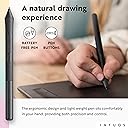
The Wacom Intuos Medium Wireless Graphics Tablet features a 10.4" x 7.8" active drawing area with battery-free EMR pen technology offering 4096 pressure sensitivity levels. It supports Bluetooth wireless and USB-A wired connections, ensuring versatile use across Windows, Mac, Chromebook, and select Android devices. Designed for professionals and creatives alike, it includes a stylish pistachio accent, eco-friendly accessories, and access to premium creative software and training.


| ASIN | B079NWPZTF |
| GTIN (Global Trade Identification Number) | 00753218986818 |
| OS1 | Compatible with Windows 7 or later/OS X 10.11 or later |
| UPC | 753218986818 |
| おすすめ度 | 5つ星のうち4.6 1,204 レビュー |
| アクティブな表面積 | 8.50" x 5.31" |
| オペレーティングシステム | Compatible with Windows 7 or later/OS X 10.11 or later |
| カラー | ピスタチオ |
| ディスプレイの種類 | LCD |
| ネイティブ解像度 | 1920x1080 |
| ブランド | Wacom(ワコム) |
| ブランド名 | Wacom(ワコム) |
| メーカー名 | Wacom Technology Corporation |
| メーカー型番 | CTL6100WLE0 |
| モデル名 | Intuos M |
| ユニット数 | 1.0 個 |
| 互換デバイス | PC。 |
| 同梱商品 | ペンタブレットミディアム、BT感圧式、バッテリー不要のワコムペン4K PVC不使用のUSB-Aケーブル、ケーブル整頓、L字型コネクタ付き。ペンの端に3つの追加標準ペン先(ペンの内側にある)ペン先取り外しツール。クイックスタートガイド。規則シート。オンラインユーザーガイドと重要な製品情報はWacom Desktop Centerに記載されています。… |
| 商品の寸法 L x W | 26.4長さ x 19.8幅 cm |
| 商品の対象 | 先生, 学生 |
| 商品の追加説明1 | ポータブル。 |
| 商品の重量 | 0.91 ポンド |
| 圧力感度 | 4096 レベル |
| 型番 | CTL6100WLE0 |
| 外部機関認定情報 | ID 00529-18-01796, ID 00529-18-01796 |
| 接続技術 | USB |
| 特徴 | ポータブル。 |
| 現在までサポートされているソフトウェアアップデート | 不明 |
| 画面サイズの単位 | 10.4 インチ |
| 筆圧感度 | 4096 レベル |
| 通信・接続インターフェース | USB |
| 魚種 | ドローイング |
H**A
تفاصيله
ممتاز وجيدا جدا المنتج
D**O
Produto Fantástico para quem já possui computador ou Note Book e quer ter produto de durabilidade!
Eu já estou utilizando a mesa, optei pela mesa pois já possuo notebook, computador, farei uso do Onenote, mas é possível utilizar com uma infinidade de softwares, inclusive da Autodesk por exemplo. Não tenho experiência com a utilização da mesa, porém já fiz a calibração com auxílio de vídeos de professores que fazem aulas online, foi excelente, treinei por volta de 3 horas e consegui assimilar a coordenação motora para o uso. Achei fantástico, até porque pelo que vi tem profissionais que utilizam o mesmo periférico há mais de 7 anos, sem a necessidade de trocar o equipamento, o Fabricante está sempre atualizando os drivers e a mesa é durável, não vou me preocupar por exemplo com tela quebrada, velocidade do processador, memória ou bateria viciada.
S**H
Great for me!
Hadn't drawn anything in about 10 years and decided to get back into it, except go digital. I bought the medium, which is just a little smaller than a standard size piece of printer paper, and I'm so glad that I didn't get the small as I had originally intended. As somebody that has never used a graphics tablet this was actually fairly easy to get into the swing of things and get the pen going where I wanted it to go. My favorite thing about the tablet is the pressure sensitivity that the pen gives. Much better than drawing with a mouse, especially when I figured out how to adjust the pressure sensitivity and line stability in my drawing programs. Nice smooth lines now, no more wobble! I use my tablet corded because my computer was not built with wireless capabilities, so I can't comment on the bluetooth abilities. However, the cord is long enough to reach my desk from the front of my tower no problem. Took me less than half an hour to get the tablet fully set up, registered, and working in one of the free programs. The website to get registered and get the programs is in the cardboard booklet and the serial number is on the back of the tablet. The only thing kind of negative I have to say about this tablet is the drawing program. Corel Painter Essential 7 is alright, but after a few days of dinking around in it I found it to be kind of lackluster. It's a nice enough program, but is a bit bare bones, and I wanted a little more without dropping hundreds of dollars on their other program. I've really been enjoying using this tablet with Medibang Paint Pro, which is also free and a bit more robust in terms of what can be done in it. So if you're having trouble redeeming the programs that come with the tablet than I would recommend giving that one a google.
J**N
Great product
Arrived in great condition. This one's a good beginner piece if you're looking to get familiar with using a tablet! :)
G**I
Mesa Muito Boa
Chegou tudo certinho e funcionando corretamente, a cor é muito bonita, design clean e discreto. Funcionalidade Bluetooth é incrível principalmente para quem não quer muitos fios na mesa. Achei ótimo vir mais 3 pontas na caneta.
Trustpilot
2 weeks ago
2 weeks ago